
Creating a good looking Ms Access form with Microsoft accessOnline EducationUpdated on Oct 12, 2017 View more like this | Visit United Kingdom, UN | Contact Ben |
Creating a good looking Ms Access form with Microsoft access
There are several factors you need to consider when creating a ms access form, knowing that designing a form is an important component of the user interface when working with ms access forms, since it is the way human beings interact with a computer. Also, note that while designing a form in Microsoft access might seems easy to create, the concept of the user interface design should not be left out when creating ms access forms. User interface design is a science that design compiles various factors that enable ease of use and understand ability all into one package easy to use look and feel which is the design.
If a form is not designed properly, users tend to experience fatigue, frustration, risk security access and can physically cause damage such as eye strain and carpal tunnel syndrome
Ms access forms are like a display case in stores that make it easier to view or get items that you want. The design of your form is an important aspect since forms are objects through which users can add, edit, or display the data stored in your Access desktop database. If your ms Access form is going to be used by multiple users, well-designed forms are essential for efficiency and data entry accuracy.
The following are a few Microsoft Access form design recommendations and examples for Access developers who want to make user-friendly Microsoft Access interfaces.
• Form colour: the first thing a user notices when viewing a form is the colour. It's important to choose design colours with good contrast having it in mind that some your users might have colour defects. Form colours are being to highlight important fields or data in ms access forms design.
• Form colour: the fewer the fonts the better. Fonts without serifs tend to be easier to read, you should stick to this advice As far as fonts are concerned when working with Microsoft Access. Avoid using several different font sizes and try to use only one or two.
• Form Layout: The key to organising fields on a screen is to group them together by a common entity called layout. You can group Name, Address, etc. together on the form in one section.
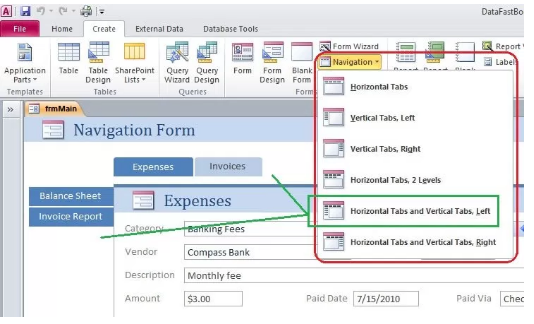
Now that you know how to make forms work better, it's time to think about what a form looks like.
About Author:
Access Database Tutorial is the leading website is about learning to build an Access database using the most effective techniques.In this Articles it talks about Microsoft access. To know more visit at
http://www.accessdatabasetutorial.com/
[email protected]
Ben Beitler
(+44) 7881 502400
United Kingdom, London
There are several factors you need to consider when creating a ms access form, knowing that designing a form is an important component of the user interface when working with ms access forms, since it is the way human beings interact with a computer. Also, note that while designing a form in Microsoft access might seems easy to create, the concept of the user interface design should not be left out when creating ms access forms. User interface design is a science that design compiles various factors that enable ease of use and understand ability all into one package easy to use look and feel which is the design.
If a form is not designed properly, users tend to experience fatigue, frustration, risk security access and can physically cause damage such as eye strain and carpal tunnel syndrome
Ms access forms are like a display case in stores that make it easier to view or get items that you want. The design of your form is an important aspect since forms are objects through which users can add, edit, or display the data stored in your Access desktop database. If your ms Access form is going to be used by multiple users, well-designed forms are essential for efficiency and data entry accuracy.
The following are a few Microsoft Access form design recommendations and examples for Access developers who want to make user-friendly Microsoft Access interfaces.
• Form colour: the first thing a user notices when viewing a form is the colour. It's important to choose design colours with good contrast having it in mind that some your users might have colour defects. Form colours are being to highlight important fields or data in ms access forms design.
• Form colour: the fewer the fonts the better. Fonts without serifs tend to be easier to read, you should stick to this advice As far as fonts are concerned when working with Microsoft Access. Avoid using several different font sizes and try to use only one or two.
• Form Layout: The key to organising fields on a screen is to group them together by a common entity called layout. You can group Name, Address, etc. together on the form in one section.
Now that you know how to make forms work better, it's time to think about what a form looks like.
About Author:
Access Database Tutorial is the leading website is about learning to build an Access database using the most effective techniques.In this Articles it talks about Microsoft access. To know more visit at
http://www.accessdatabasetutorial.com/
[email protected]
Ben Beitler
(+44) 7881 502400
United Kingdom, London

Creating a good looking Ms Access form with Microsoft access
34 Edgwarebury Lane, Edgware, Middlesex,UK 34 Edgwarebury Lane, Edgware, Middlesex,UK London, London HA88LW
