
Remote Access in Tally.ERP9Accounting & Finance SoftwareUpdated on Sep 26, 2018 View more like this | Visit Saudi Arabia, UN | Contact Manal Technology |
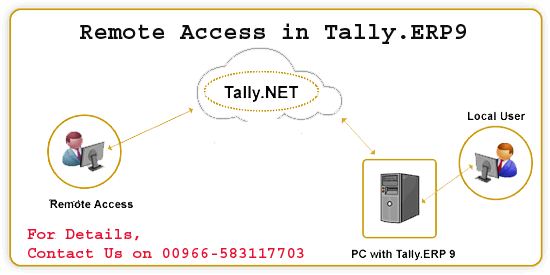
Remote Access in Tally.ERP9 is made possible by the Tally.NET framework, which provides a secure connection through trusted Remote Access. Tally.NET, which does not store any data, uses advanced encryption to ensure that it cannot be accessed by anyone outside the system. You can also contact the support center at Tally.ERP9 for expert solutions.
What you need to use the Remote Access feature in Tally.ERP9 requires only a Tally.NET subscription, a computer with Tally.ERP9, and an Internet connection. You can even use the Education version of Tally.ERP9 for remote access. To enable or configure Remote Access in Tally.ERP9:
• Go to Gateway of Tally -> F11: Properties -> F4: Tally.NET features
• Enter the Contact Name and the Contact Number
• Set Company Yes to Allow Company Connection
• Set Yes to Enable SMS Access and SMS Company Name.
• Press “Ctrl + A” to accept the screen.
For more information on Remote Access in Tally.ERP9 software, please get in touch with our experts on 00966-583117703 or log on to website at http://manalpro.com/tally/tally-erp-multi-user-gold/.
What you need to use the Remote Access feature in Tally.ERP9 requires only a Tally.NET subscription, a computer with Tally.ERP9, and an Internet connection. You can even use the Education version of Tally.ERP9 for remote access. To enable or configure Remote Access in Tally.ERP9:
• Go to Gateway of Tally -> F11: Properties -> F4: Tally.NET features
• Enter the Contact Name and the Contact Number
• Set Company Yes to Allow Company Connection
• Set Yes to Enable SMS Access and SMS Company Name.
• Press “Ctrl + A” to accept the screen.
For more information on Remote Access in Tally.ERP9 software, please get in touch with our experts on 00966-583117703 or log on to website at http://manalpro.com/tally/tally-erp-multi-user-gold/.
