
How to create Security Level in Tally.ERP9?Accounting & Finance SoftwareUpdated on Oct 8, 2018 View more like this | Visit Saudi Arabia, UN | Contact Manal Technology |
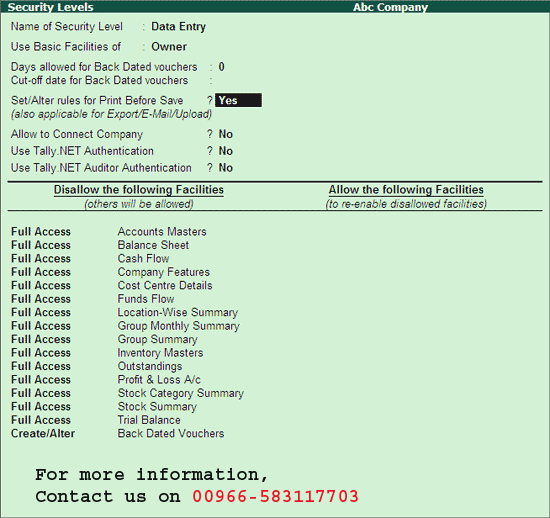
You can create users, assign security levels, restrict/allow remote access and local TDLs for the users created in Tally.ERP9.
To create a user and assign a password, follow these steps:
Enter Gateway of Tally -> F3: Company Info -> Security Control
• Select Users and Passwords
• The user list screen is displayed for the Company
• Select the required Level from the Security List
• Enter the user name in the field.
• Enter the password.
• By default, Allow Remote Access and Allow Local TDL are set to “No” for users that are not classified under the Tally.NET User.
• Accept to create the user
You can use the same menu to change or delete User, Password and Security Types. To delete a user, go to the User List screen for the Company, delete and save the user. It is recommended that you delete the User before deleting the security level.
For more information on How to create Security Level in Tally.ERP9 software, please get in touch with us on 00966-583117703 or log on to the website at http://manalpro.com/tally/tally-erp-multi-user-gold/.
To create a user and assign a password, follow these steps:
Enter Gateway of Tally -> F3: Company Info -> Security Control
• Select Users and Passwords
• The user list screen is displayed for the Company
• Select the required Level from the Security List
• Enter the user name in the field.
• Enter the password.
• By default, Allow Remote Access and Allow Local TDL are set to “No” for users that are not classified under the Tally.NET User.
• Accept to create the user
You can use the same menu to change or delete User, Password and Security Types. To delete a user, go to the User List screen for the Company, delete and save the user. It is recommended that you delete the User before deleting the security level.
For more information on How to create Security Level in Tally.ERP9 software, please get in touch with us on 00966-583117703 or log on to the website at http://manalpro.com/tally/tally-erp-multi-user-gold/.
