
How to Backup Data in Tally ERP9 Software?Accounting & Finance SoftwareUpdated on May 23, 2018 View more like this | Visit Saudi Arabia, UN | Contact Manal Technology |
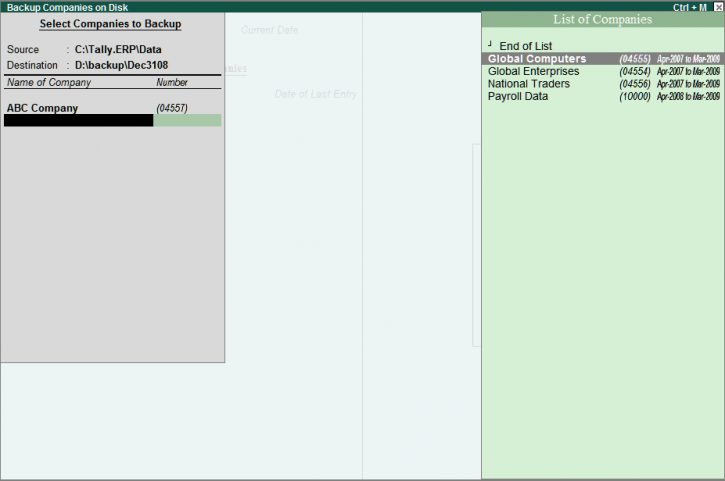
Follow these simple steps to have a backup data for your organization in Tally ERP9 Software:
• From Gateway of Tally, click F3 or ALT+F3 for Company Info.
• Select Backup
• In the Backup Companies on Disk screen, the cursor is at Name of the Company.
• Press Backspace to change the Source or the Destination.
• Source: It is the source folder that contains data for which backup has to be taken, by default it is the Data folder of Tally.ERP9 (Ex. C:Tally.ERPData).
• Destination: It is either a folder or an external device like Pen Drive or Portable Hard Disk connected to the same or another computer where the data backup has to be stored. (Ex. D:BackupDec3108)
• Select the list of companies for which you need backup. To stop selecting the companies, select 'End of the List'.
• Press Enter to confirm Accept? ‘Yes or No’ to continue taking the backup.
• The Backup Companies screen is displayed with the name of the company being backed up and the percentage of the backup process.
• If the List of Companies contains one or more Tally Vaulted companies, then Tally.ERP9 software allows the user to select a single company at a time.
To know more on how to backup data in Tally.ERP9 software, make a call on 00966583117703 or log on to website: http://manalpro.com/tally/company.
• From Gateway of Tally, click F3 or ALT+F3 for Company Info.
• Select Backup
• In the Backup Companies on Disk screen, the cursor is at Name of the Company.
• Press Backspace to change the Source or the Destination.
• Source: It is the source folder that contains data for which backup has to be taken, by default it is the Data folder of Tally.ERP9 (Ex. C:Tally.ERPData).
• Destination: It is either a folder or an external device like Pen Drive or Portable Hard Disk connected to the same or another computer where the data backup has to be stored. (Ex. D:BackupDec3108)
• Select the list of companies for which you need backup. To stop selecting the companies, select 'End of the List'.
• Press Enter to confirm Accept? ‘Yes or No’ to continue taking the backup.
• The Backup Companies screen is displayed with the name of the company being backed up and the percentage of the backup process.
• If the List of Companies contains one or more Tally Vaulted companies, then Tally.ERP9 software allows the user to select a single company at a time.
To know more on how to backup data in Tally.ERP9 software, make a call on 00966583117703 or log on to website: http://manalpro.com/tally/company.
