
HOW TO CHOOSE A GRAPHIC TABLET FOR DRAWING?ElectronicsUpdated on Mar 1, 2019 View more like this | Visit CHICAGO, IL | Contact Ann Wanges |
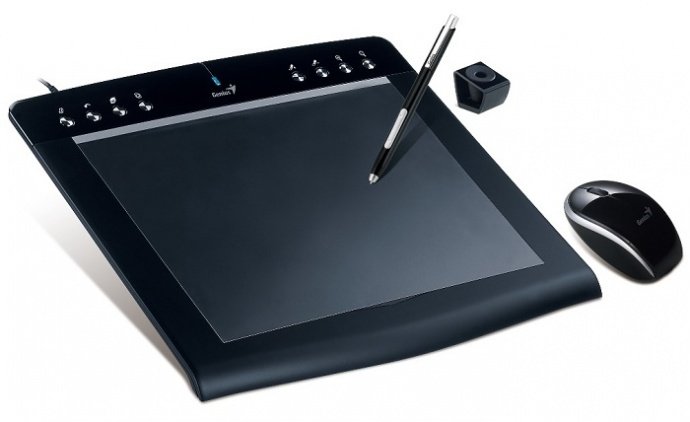
HOW TO CHOOSE A GRAPHIC TABLET FOR DRAWING?
Types of graphics tablets
Currently, there are 3 main types of graphics tablets:
1. Providing input to a computer device of any graphics information. These tablets are equipped with a special pen, with which you can draw on the active surface of the device. They have sizes mainly up to A4.
2. Mini-tablets. Small electronic notebooks for business use. Often used to digitize signatures on documents and other simple operations.
3. Interactive displays. Gadgets that combine tablet and monitor functions in one device. You can work with a pen directly on the surface of the device, where the results of your work will be displayed. They have many additional features, large format, and high cost.
Main technical specifications
To solve the problem, how to choose a graphics tablet, you need to decide on the basic parameters that characterize each model. The most important indicators for effective work include:
-the size of the active area;
-pen power supply;
-positioning accuracy;
-pressure sensitivity;
-response speed;
-resolution;
-tilt angle;
-function buttons.
When choosing a device for personal use, consider the main goals and objectives of the acquisition. If you are just starting to get acquainted with the basics of graphic design, try your hand at an inexpensive device.
If you need a tablet for processing large volumes of photos and design content, then check out the line of professional graphics tablets of the most popular brands.
For highly skilled users, the most advanced models with specific capabilities and advanced functionality are suitable for effectively building the most complex drawings.
Types of graphics tablets
Currently, there are 3 main types of graphics tablets:
1. Providing input to a computer device of any graphics information. These tablets are equipped with a special pen, with which you can draw on the active surface of the device. They have sizes mainly up to A4.
2. Mini-tablets. Small electronic notebooks for business use. Often used to digitize signatures on documents and other simple operations.
3. Interactive displays. Gadgets that combine tablet and monitor functions in one device. You can work with a pen directly on the surface of the device, where the results of your work will be displayed. They have many additional features, large format, and high cost.
Main technical specifications
To solve the problem, how to choose a graphics tablet, you need to decide on the basic parameters that characterize each model. The most important indicators for effective work include:
-the size of the active area;
-pen power supply;
-positioning accuracy;
-pressure sensitivity;
-response speed;
-resolution;
-tilt angle;
-function buttons.
When choosing a device for personal use, consider the main goals and objectives of the acquisition. If you are just starting to get acquainted with the basics of graphic design, try your hand at an inexpensive device.
If you need a tablet for processing large volumes of photos and design content, then check out the line of professional graphics tablets of the most popular brands.
For highly skilled users, the most advanced models with specific capabilities and advanced functionality are suitable for effectively building the most complex drawings.
